Compound Document Builder
Assemble new documents from passages of existing works — the Xanadu EDL model, made visual
- What Is a Compound Document?
- Why Use Compound Documents?
- How to Use the Builder
- Example 1: Single-Source Compound
- Example 2: Multi-Source Compound
- Example 3: Legal Brief Assembly
- Example 4: Literary Anthology
- Understanding the Structure
- Provenance and Attribution
- Export & Print (HTML / PDF)
- EDL Export (machine-readable)
- Try It Live
- Connection to Udanax-Gold
What Is a Compound Document?
A compound document is a document assembled from passages of other documents. Instead of writing everything from scratch, you select relevant passages from existing works and arrange them with your own connecting text. Each transcluded passage maintains a live reference to its source — if the source changes, the transclusion updates.
This is Ted Nelson's EDL (Edit Decision List) concept: the document doesn't contain copies of text — it contains addresses pointing to text in other documents. When you read a compound document, the system fetches and assembles the referenced content in real time.
Why Use Compound Documents?
Never Copy-Paste Again
Transclusion replaces copy-paste. The passage stays connected to its source. No drift, no outdated copies.
Automatic Attribution
Every transcluded passage carries its provenance. Readers can trace any quote back to its origin in one click.
Live Updates
If a source document is revised, the transcluded content updates in your compound — through span migration.
Build Arguments
Assemble evidence from multiple sources, add your analysis between them. The structure IS the argument.
Misquote-Proof
Because passages are live references, readers can verify they match the source. No cherry-picking or distortion.
Reusable Structure
Others can transclude from YOUR compound into theirs. Content flows through the docuverse with full provenance.
How to Use the Builder
Opening the Builder
Open any document and click "Build" in the document toolbar (next to "Compare" and "Perspective"). The three-panel builder layout opens:
Step-by-Step
- Add a source: Click "+ Add source" in the left panel. Pick a document from your library.
- Read the source: Click the source name to expand its text in the lower-left panel.
- Select a passage: Click and drag to select text in the source. The "Include passage" button appears at the top.
- Include it: Click "Include passage". The text is transcluded into your document at the end.
- Repeat: Add more sources, include more passages. Mix in your own original text.
- Review structure: The right panel shows the document composition — what's original vs. what's transcluded.
- Done: Click "Done" to return to the normal editor. Your compound is saved.
- Source highlighting — Click a transclusion (colored block) in the center panel. The source panel switches to the originating work and highlights the matching passage in yellow for 4 seconds, scrolling it into view.
- EDL export — Click "Export EDL" to download a JSON file containing the document's content references. Each entry is typed as
text(original) ortransclusion(with source work ID, character positions, and resolved text).
RangeElement::Transclusion
in the O-tree CRDT. The transclusion stores the source work ID, character span, and BLAKE3 content hash.
Span migration keeps positions valid through edits. Provenance chains trace each passage back to its origin.
Example 1: Single-Source Compound
Quoting a Single Source with Commentary
You're writing a response to an essay. You want to quote specific passages and respond to each one.
Structure:
- 1.Original"In this response, I argue that..."
- 2.From: Essay"The author claims that X is true."
- 3.Original"This claim overlooks the evidence in..."
- 4.From: Essay"Furthermore, the data shows..."
- 5.Original"However, this data is from 2010. More recent..."
- 6.From: Essay"In conclusion, X implies Y."
- 7.Original"I disagree. X does not imply Y because..."
Each quote is a live transclusion. If the essay is revised, your document shows the updated quotes automatically. Readers can click any quote to verify it against the source.
Example 2: Multi-Source Compound
Building a Literature Review
You're surveying multiple papers on a topic. Each paper contributes a key finding.
Structure:
- 1.Original"Recent research on topic Z has shown..."
- 2.From: Paper A"We found a 40% improvement using method M."
- 3.Original"This established M as the standard, but..."
- 4.From: Paper B"Method M fails when applied to large datasets."
- 5.Original"This limitation led researchers to explore..."
- 6.From: Paper C"Our hybrid approach combines M with N."
- 7.From: Paper A"In our follow-up study, we confirmed..."
- 8.Original"Together, these findings suggest..."
- 9.From: Paper D"Contrary to earlier results, we observed..."
- 10.Original"This disagreement motivates further study."
Four sources, one document. Each finding is traceable to its paper. The structure shows how ideas build on and challenge each other.
Example 3: Legal Brief Assembly
Building a Legal Argument from Statutes and Precedents
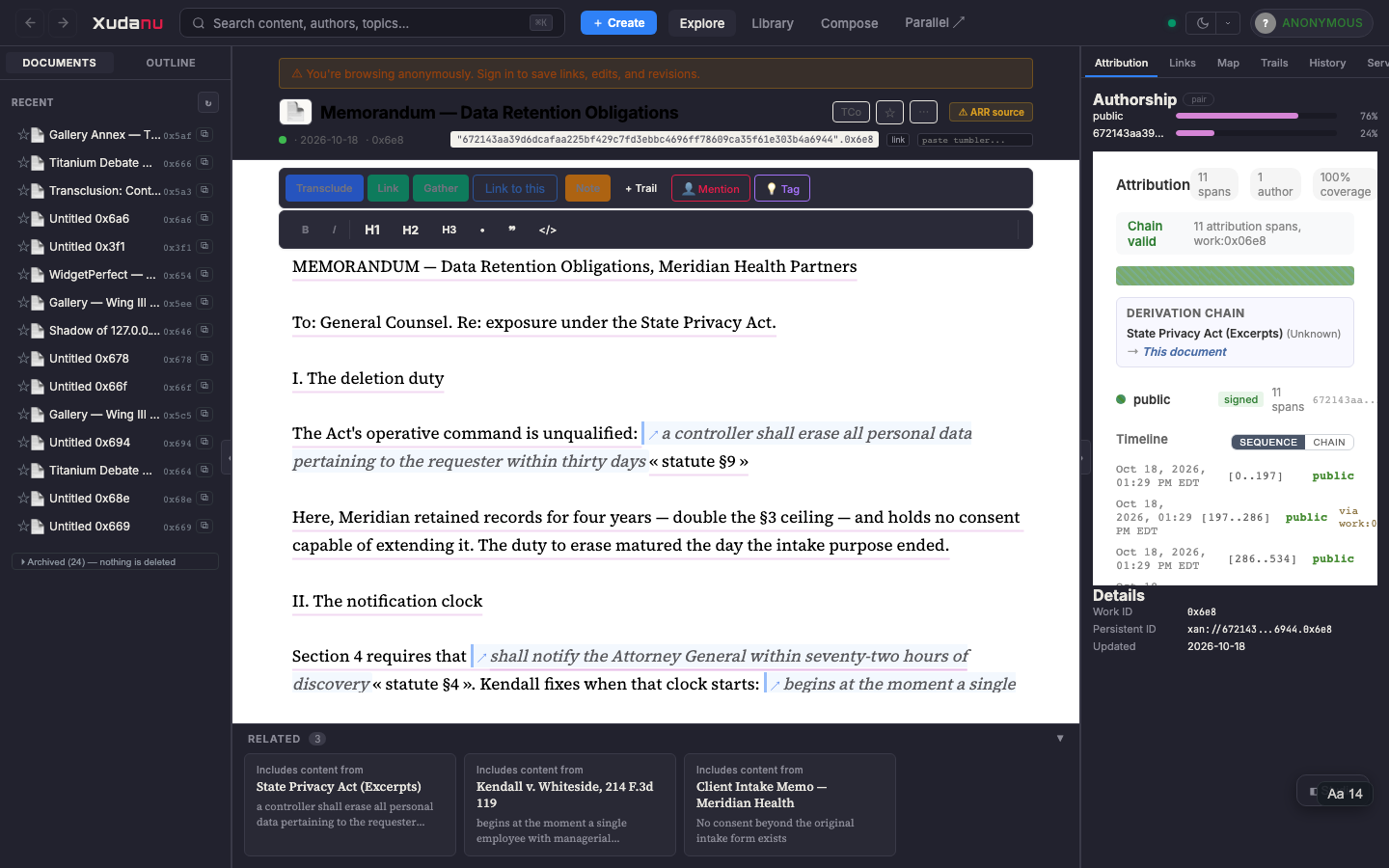
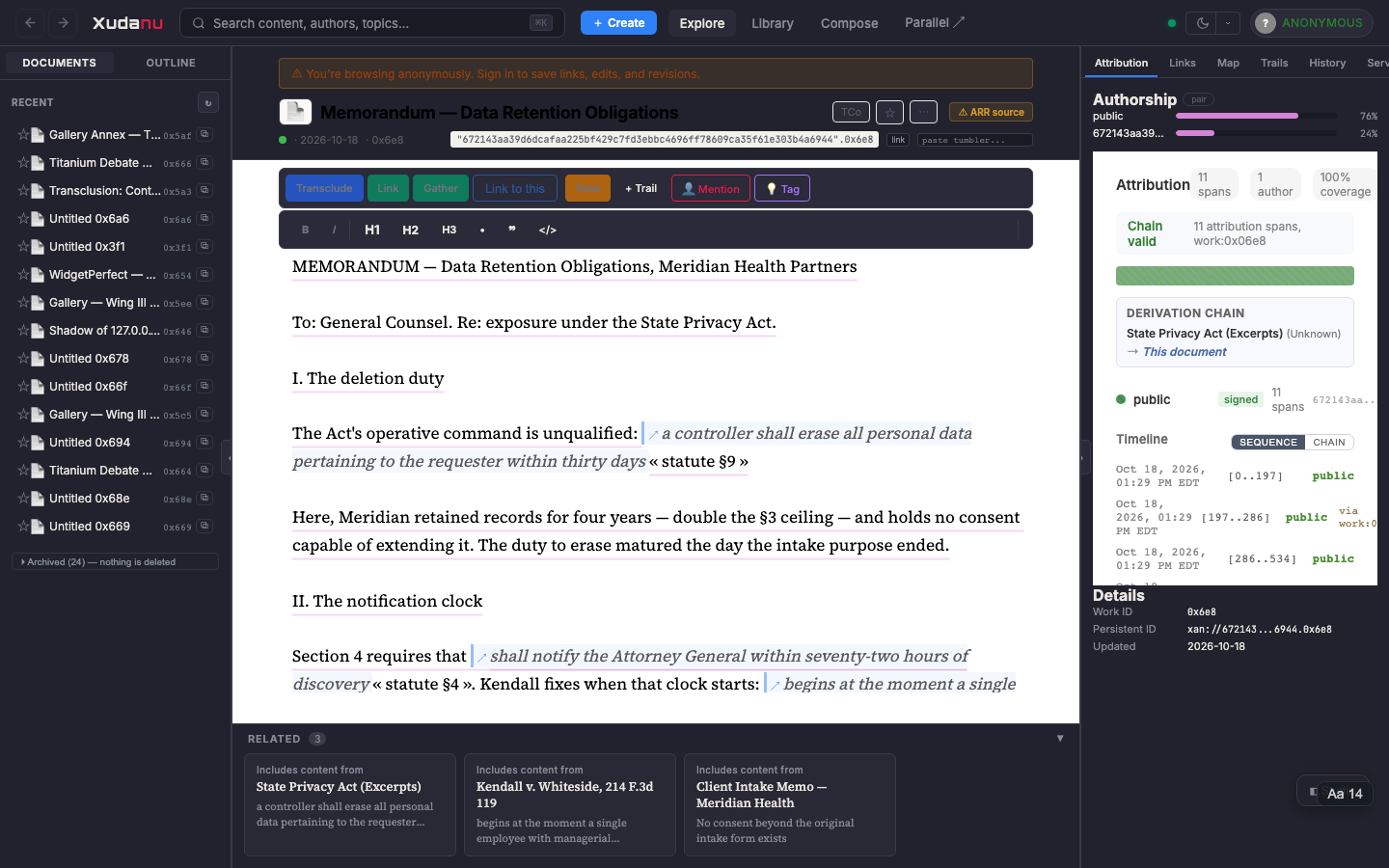
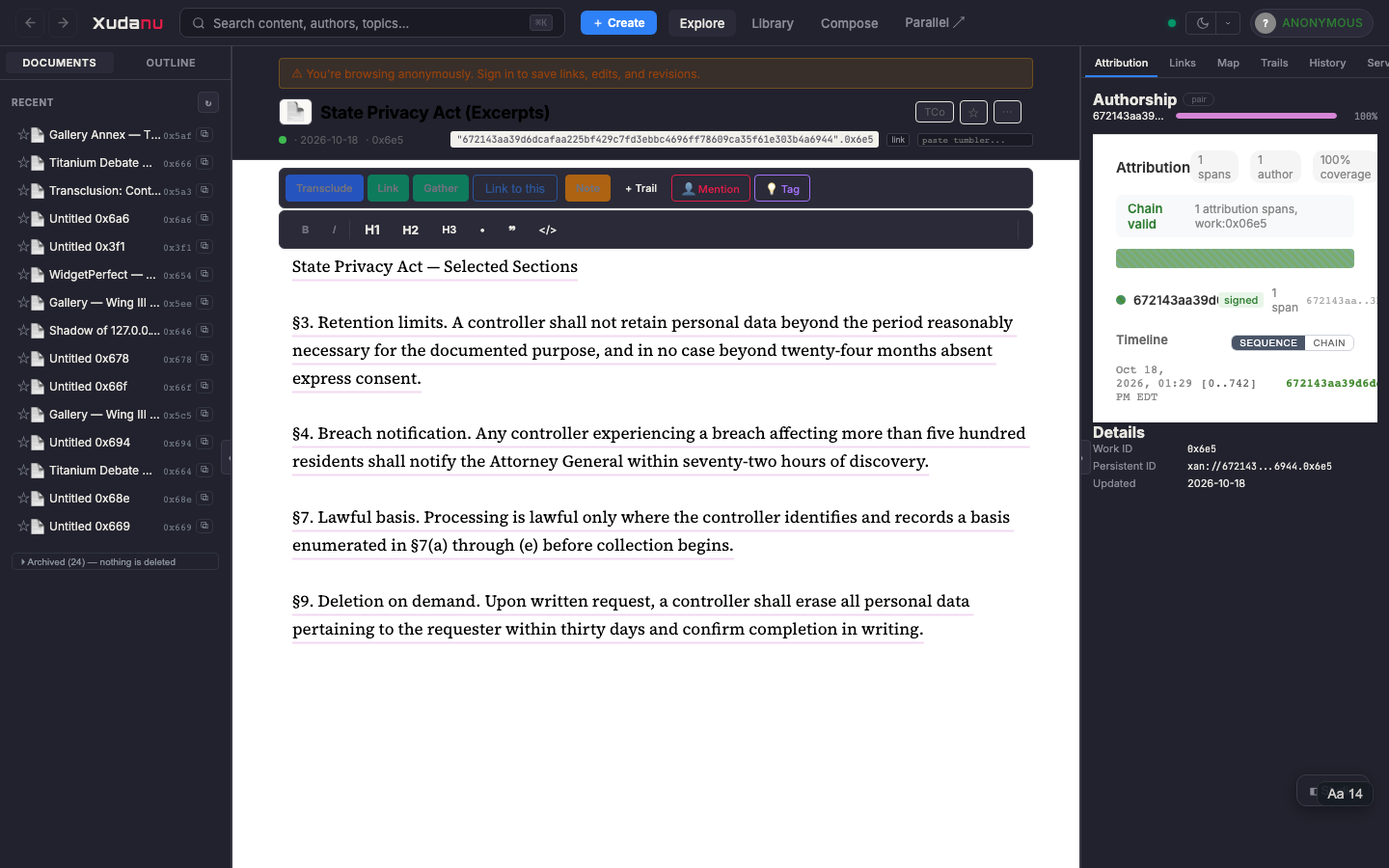
A legal brief is inherently a compound document — it assembles statutes, case law, and client facts into a coherent argument. This example is no longer hypothetical: a complete working corpus ships with the system (see Try It Live).
The seeded corpus — Memorandum: Data Retention Obligations — assembles one brief from three sources:
- 1.Original"I. The deletion duty — The Act's operative command is unqualified:"
- 2.From: State Privacy Act §9"a controller shall erase all personal data… within thirty days"
- 3.Original"Here, Meridian retained records for four years…"
- 4.From: State Privacy Act §4"shall notify the Attorney General within seventy-two hours"
- 5.From: Kendall v. Whiteside"begins at the moment a single employee… acquires knowledge"
- 6.Original"III. Exposure — The penalty structure compounds the concern:"
- 7.From: Kendall v. Whiteside"The penalty provision applies per-breach, not per-recipient"
- 8.From: Client Intake Memo"No consent beyond the original intake form exists"
- 9.Original"IV. Weak point — I recommend pulling the executed forms…"
Five live quotations from three sources: statute, precedent, and client facts. The lawyer's analysis weaves them; every quotation is verifiable and follows back to its exact origin. Edit the statute and the brief flags the drift — visible, honest, never silently incorrect.
Example 4: Literary Anthology
Curating a Thematic Collection
You're assembling a collection of passages from different works that explore a common theme.
Structure:
- 1.Original"The theme of memory appears throughout..."
- 2.From: Proust"Remembrance of things past is not..."
- 3.Original"Proust's involuntary memory contrasts with..."
- 4.From: Borges"I cannot walk through the suburbs in the..."
- 5.From: Sebald"It does not seem to me that we understand..."
- 6.Original"Both Borges and Sebald treat memory as..."
- 7.From: Nelson"The interconnectedness of all literature..."
- 8.Original"Nelson's vision of connected literature..."
Four authors in conversation. The curator's notes bridge the passages. Each quote is a live link to the source text — readers can explore the original context.
Understanding the Structure
The structure outline (right panel) shows your document's composition. Each entry is either:
The outline tells you:
- How many sources you're drawing from
- The ratio of original to transcluded content
- The order in which passages appear
- Which source each passage comes from
A document with 0 transclusions is just a regular document. A document with 1+ transclusions is a compound.
Provenance and Attribution
Every transcluded passage carries provenance — a chain showing where the content originated and how it reached your document. This is Gold's again() function: recursive tracing of content reuse.
To view the provenance chain for a transcluded passage, click the passage and select "Trace provenance". The chain shows each hop with the work title, author, and whether the content is original or derived.
Export & Print (HTML / PDF)
A compound document must travel — to a client, a colleague, a court. The export renders the assembled document as a standalone, professionally styled HTML file in which every transclusion becomes a cited quotation: the passage set off with a rule, and beneath it the source title and its permanent xan:// address. The provenance that lives in the system travels into the artifact.
Where to find it:
- Document settings (⚙) —
↥ Export document (HTML)downloads the file;⌃ Print / Save as PDFopens the print dialog (every major browser saves as PDF natively — no PDF library, works offline). - Compound Builder —
⌃ Print / PDFin the structure footer, for printing the document you are actively assembling.
The footer of every export states its own composition: "5 transcluded passages from 3 source documents — every quotation above carries its origin address." A lawyer can file it; an auditor can follow it.
EDL Export (machine-readable)
A compound document is fundamentally an EDL — a list of content references. The structure can be exported as JSON:
{
  "version": 1,
  "title": "My Legal Brief",
  "entries": [
    { "type": "text", "content": "Introduction paragraph..." },
    {
      "type": "transclusion",
      "source_work_id": "0x415",
      "source_title": "Penal Code",
      "char_start": 120,
      "char_end": 340,
      "content_hash": "a1b2c3...",
      "resolved_text": "Grand theft is theft committed when..."
    },
    { "type": "text", "content": "Analysis paragraph..." }
  ]
}
This format is compatible with the Xanadu EDL concept and could be imported by other systems that understand content-addressed transclusion.
Try It Live
Everything in this guide runs on a fresh server:
# the self-referential essay demo (two sources, one compound)
xudanu-server run 127.0.0.1:8080 ./data --seed-compound-demo

# the lawyer scenario (statute + precedent + memo + assembled brief),
# against an already-running server:
node scripts/seed-lawyer-demo.mjs
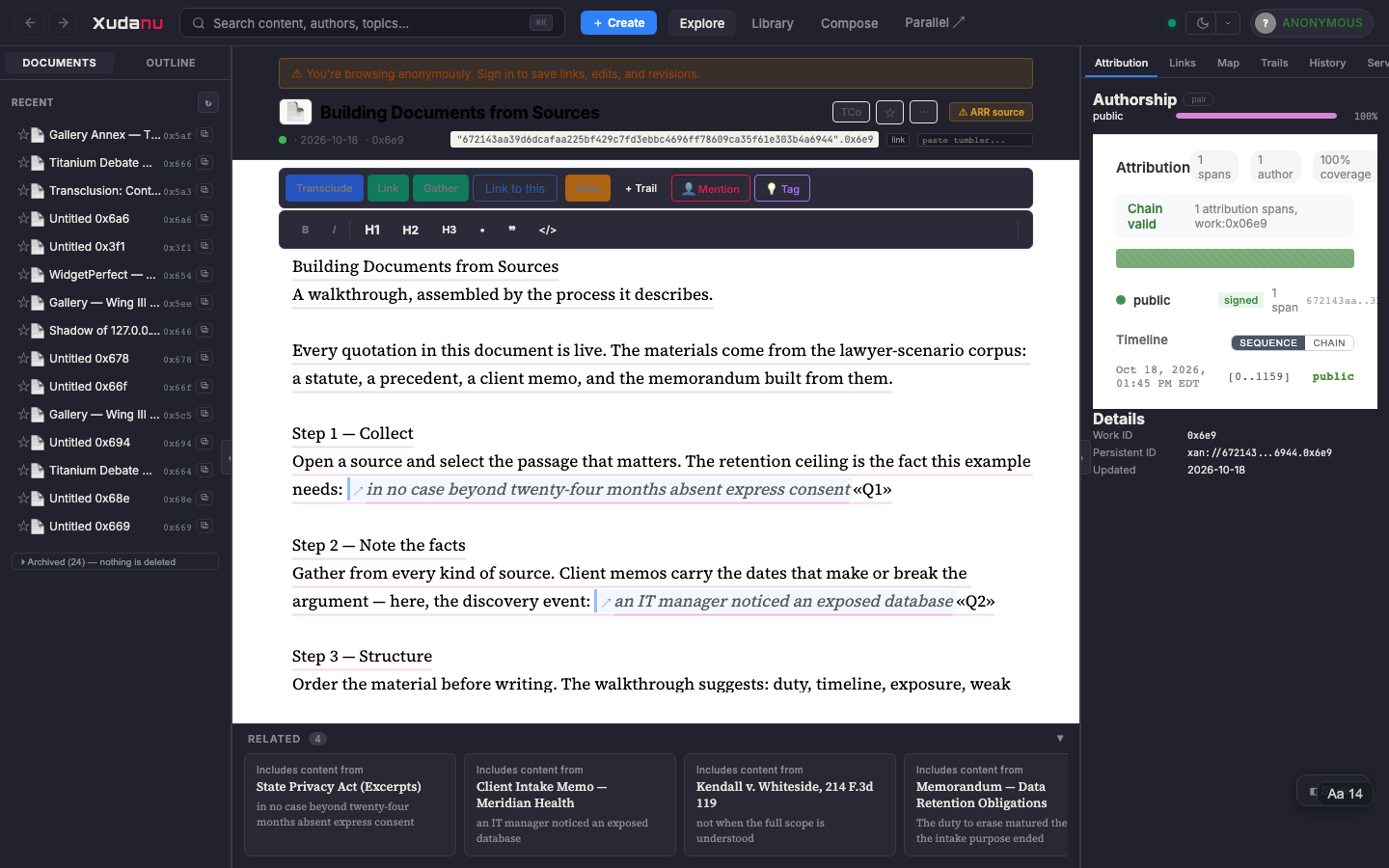
node scripts/seed-walkthrough.mjs   # "Building Documents from Sources"
The walkthrough document — "Building Documents from Sources" — teaches compound assembly by performing it: each step quotes live material from the corpus, and Step 4 quotes the finished memorandum itself. It is the fastest on-ramp: open it, click any quotation to visit its origin, edit a source and watch the drift flag appear.
Connection to Udanax-Gold
Gold's primary document creation model was compound-based. The compound builder is the modern equivalent of Gold's assembly facilities:
| Gold concept | Xudanu equivalent | What it does |
|---|---|---|
Enfilade | O-tree CRDT | Stores document structure |
Tumbler | BeId + char position | Addresses content within works |
| Transclusion link | RangeElement::Transclusion | Inline reference to source passage |
again() | compute_provenance_chain | Recursive content origin tracing |
| Intercomparison | find_shared_regions + Perspective | Visual document comparison |
| Bazik (assembly) | Compound Builder | Visual document assembly |
The compound builder completes the loop: it provides the authoring tool that makes the docuverse structure buildable. Without it, users can link and view documents but can't easily build new documents from existing content. With it, the full Xanadu model — create, connect, transclude, trace — is available in a visual interface.
Stretch Goals: Where the Builder Could Go
The current Compound Builder is Phase 1 — basic assembly. Here's what it could become:
Drag to Reorder
Drag transcluded passages up/down to rearrange your document. The O-tree CRDT already supports position changes — we just need the drag UI.
Drag from Source
Instead of select-then-click, drag selected text directly from a source panel into the document at the exact insertion point. Visual drop indicator shows where it lands.
Compound from Trail
Convert a trail (curated reading sequence) into a compound document. Each trail stop becomes a transcluded passage, with your connecting text between them. Result: a guided anthology built from the docuverse.
Perspective Integration
Enter Build mode directly from the Perspective view. Drag passages from neighbor columns into your center document. Sources auto-populate from Perspective neighbors. Build while you explore.
Fuzzy Match Suggestions
When you type text similar to a passage in another document, the Builder suggests: "This resembles a passage in [Source]. Transclude instead?" Turns accidental duplication into intentional structure.
Version Sync
When a source document is revised, the Builder shows which transclusions are affected. Option to update to latest source version, or keep the original. Diff view shows what changed.
Auto-Citation
Generate citations from transclusion provenance. Format as MLA, APA, Chicago, or legal (Bluebook). Inline citations auto-inserted. Bibliography auto-generated from all transclusion sources.
Templates
Pre-defined compound templates: Legal Brief (statute + precedent + analysis sections), Literature Review (paper + critique + synthesis), Debate Brief (claim + counter-claim + rebuttal). Template defines structure; user fills with transcluded content.
EDL Import
Import an EDL (Edit Decision List) from an external source. The Builder creates the compound from the EDL's content references, fetching each source passage. Interoperability with other Xanadu-lineage systems.
Nested Compounds
A compound document can itself be a source for another compound. The Builder shows nesting depth. Structure outline uses indentation to show hierarchy. Provenance chains trace through multiple levels of assembly.
Collaborative Assembly
Multiple users build the same compound simultaneously via CRDT. Each user sees the other's transclusions appear in real-time. Useful for team research projects, collaborative legal briefs, group anthologies.
Smart Compilation
The Builder analyzes your original text and suggests relevant passages from the docuverse using content fingerprinting. "You mentioned X — here are passages from 3 works that discuss X. Include any?"
Priority Order
| Feature | Effort | Impact | Why |
|---|---|---|---|
| Drag to reorder | Small | High | Essential for document flow |
| Compound from Trail | Small | High | Connects two existing features |
| Perspective integration | Medium | High | Build while exploring |
| Fuzzy match suggestions | Medium | High | Proactive structure building |
| Auto-citation | Medium | High | Real-world academic use case |
| Version sync | Medium | Medium | Important for long-lived compounds |
| Templates | Medium | Medium | Lowers barrier for new users |
| EDL import | Small | Low | Interoperability |
| Nested compounds | Automatic | Low | Already works, needs UI |
| Collaborative assembly | Already works | Medium | CRDT handles it; needs testing |
| Smart compilation | Large | High | AI-assisted authoring |